Set Up Webhooks
Webhooks let you send popup data to other tools automatically. When someone completes a popup, Spur can notify your automation platform, CRM, or custom endpoint in real time — no manual export needed.
Why Use Webhooks?
The #1 use case: When someone wins a Spin to Win or Scratch Card prize, automatically send them a WhatsApp message with their discount code. This dramatically increases code redemption rates.
In this guide
1Webhook Settings Page
From your Spur Popups dashboard, click "Settings" in the left sidebar to see the webhook configuration page:
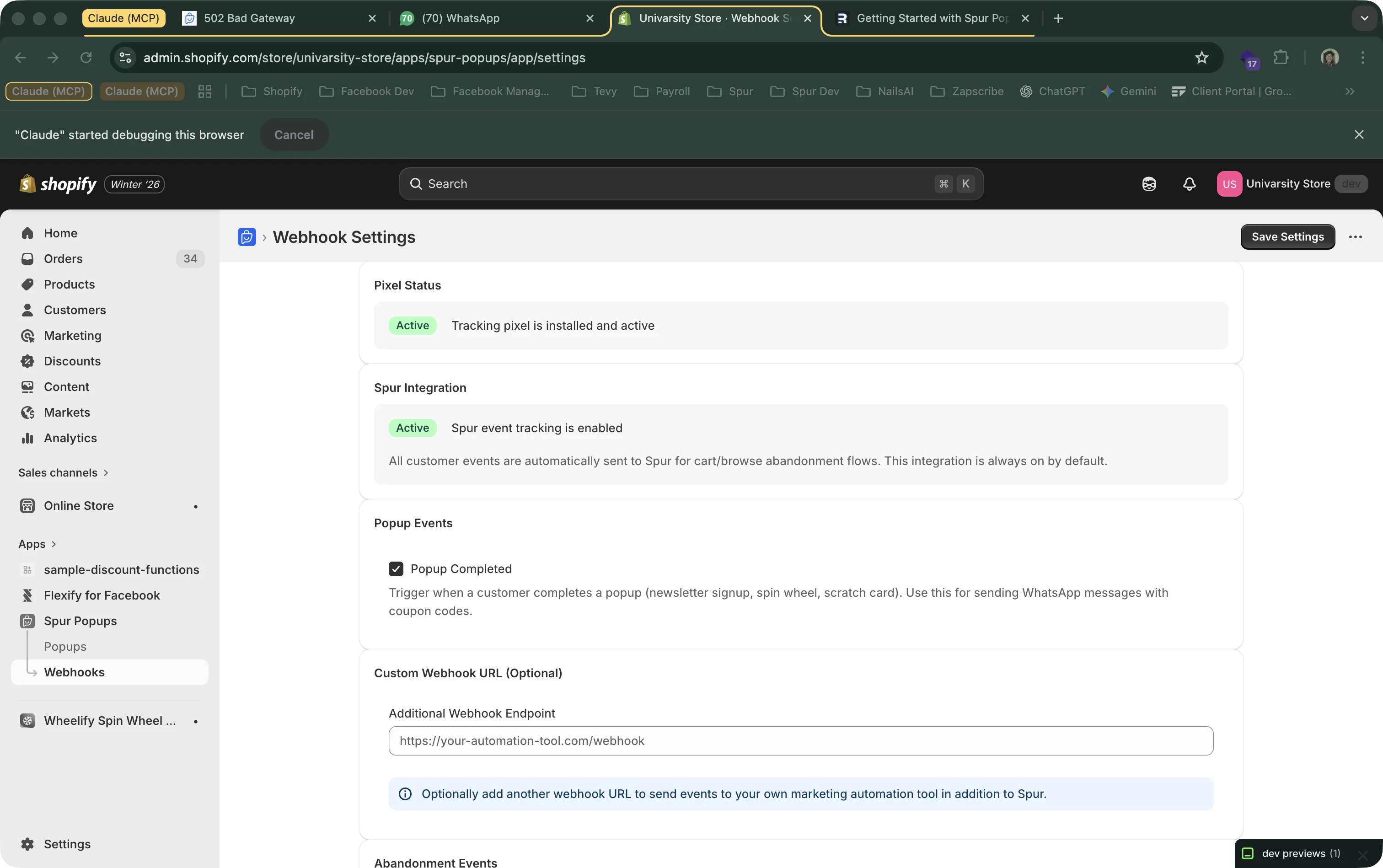
The settings page has key sections: Pixel Status, Spur Integration, Popup Events, Custom Webhook URL, and Historical Submissions API for provider backfills. Let's go through each one.
2Spur Integration (Built-In)
Spur Popups integrates directly with Spur's automation platform. This is enabled by default and sends all customer events to Spur.
Spur Integration
Customer events (product views, add to cart, checkout) are automatically tracked and sent to Spur. This powers cart abandonment flows, browse abandonment sequences, and WhatsApp marketing.
What Spur Gives You
WhatsApp & SMS Automation
When someone completes a popup, automatically send their discount code via WhatsApp or SMS.
Cart Abandonment Flows
If a popup subscriber adds to cart but doesn't purchase, trigger follow-up messages with their discount code.
Browse Abandonment
Track product views and send personalized reminders with relevant discounts.
Customer Event Tracking
Product views, add to cart, checkout started, collection viewed, search, and page views are all tracked.
3Popup Events
Toggle the "Popup Completed" event to trigger webhooks when visitors complete any popup type:
Popup Completed
Fires when a visitor completes a newsletter signup, spin wheel, or scratch card. Includes their email, phone, prize info, and discount code.
Best Use Case: WhatsApp Coupon Delivery
Enable this event + Spur Integration = When someone wins a spin wheel prize, they instantly receive a WhatsApp message with their discount code. This is the highest-converting way to deliver discount codes because visitors see it immediately on their phone.
4Custom Webhook URL
Want to send popup events to your own tools? Add a custom webhook URL. Events are sent as HTTP POST requests with JSON payloads.
Additional Webhook Endpoint
This sends events in addition to the Spur integration. Both endpoints receive the same data.
Works With
Zapier
Use a Zapier Webhook trigger to connect to 5,000+ apps.
Make (Integromat)
Set up a webhook module to receive popup events.
Klaviyo
Send subscriber data directly to your Klaviyo lists.
n8n / Custom Backend
Any endpoint that accepts POST requests with JSON.
5Historical Submissions API
Webhooks cover real-time delivery. If a merchant configures flows later, providers can still import past submissions using a pull API with cursor-based pagination.
What this solves
- Backfill all previous popup completions for flow setup after launch.
- Replay missed rows if webhook delivery was temporarily unavailable.
- Run incremental polling using stable cursors and dedupe keys.
6Webhook Payload Format
When a popup is completed, this JSON payload is sent to your webhook endpoint(s):
{
  "event": "popup_completed",
  "timestamp": "2026-01-26T12:00:00Z",

  "popup_type": "spin_wheel",
  "popup_id": "cmkf6g6z20009...",
  "popup_name": "Holiday Spin to Win",

  "customer": {
    "email": "user@example.com",
    "phone": "+919876543210",
    "name": "John Doe",
    "isIdentified": true
  },

  "prize": {
    "label": "15% OFF",
    "type": "percent",
    "value": 15,
    "discount_code": "SPINABC123",
    "discount_code_id": "gid://shopify/DiscountCode/1234567890"
  },

  "source_url": "https://your-store.myshopify.com/products/example",
  "device_type": "mobile",

  "consent": {
    "marketing": false,
    "email": true,
    "sms": true,
    "whatsapp": true
  },

  "shop": {
    "domain": "your-store.myshopify.com"
  }
}
Key Fields
popup_type
One of: "newsletter", "spin_wheel", or "scratch_card". Use this to build conditional logic in your automation (e.g., different flows for each type).
prize.type
One of: "percent", "amount", "free_shipping", "custom_code", or "nothing". For newsletter popups without discounts, prize is null.
prize.discount_code
The unique Shopify discount code generated for this visitor. Use uppercase letters and numbers only for WhatsApp copy-code buttons.
consent
Individual consent flags for each marketing channel. Only send messages on channels the visitor consented to. See our GDPR & Compliance guide for details.